
A customer orders a birthday gift. Your site doesn’t tell them when it’ll arrive, so they assume a few days — reasonable, given how most online shopping works. It shows up eight days later, after the birthday. They return it. Not because the product was wrong. Because the timing was.
If you’ve noticed returns with notes like “no longer needed” or “arrived too late,” you’re not dealing with a product problem — you’re dealing with an expectations problem. Here’s how delivery estimates fix it, and what to watch out for so you don’t create the opposite issue.
Why Timing-Related Returns Happen
When a product page doesn’t show a delivery estimate, the customer fills that gap with their own guess — usually the fastest realistic scenario they can imagine. If your actual delivery takes longer than their guess, the order is functionally late even though you never promised a specific date.
This matters most for time-sensitive purchases: gifts, event outfits, replacement parts for something broken now. These are exactly the orders most likely to come back if the delivery window wasn’t clear upfront.
| 💡 PRO TIP If you sell anything tied to a date — gifts, seasonal items, event-specific products — consider adding a note near the delivery estimate flagging how close it is to typical gift-giving windows. A clear estimate lets the customer decide for themselves whether it’ll arrive in time, instead of assuming and being disappointed. |
The Fix: Set the Expectation Before the Order, Not After
Showing an accurate delivery window on the product page — before the customer commits — gives them the chance to self-select out if the timing doesn’t work. That’s a lost sale in the short term, but it’s a return, a support ticket, and a bad review avoided.
QuickShipD calculates this window automatically from your minimum and maximum delivery days, cutoff time, and non-delivery days, and displays it directly on the product page, above the add-to-cart button — the same placement Amazon uses because it’s where the decision actually happens.

Don’t Just Show a Date — Show the Right One
Here’s where this can backfire: showing a delivery estimate that’s too optimistic causes exactly the same problem you’re trying to solve, just with extra frustration attached, because now you made a specific promise and broke it.
If certain products genuinely take longer — made-to-order items, products from a slower supplier, anything currently on backorder — use per-product overrides rather than letting your store-wide estimate apply everywhere. In QuickShipD, this lives in the product’s Shipping tab.
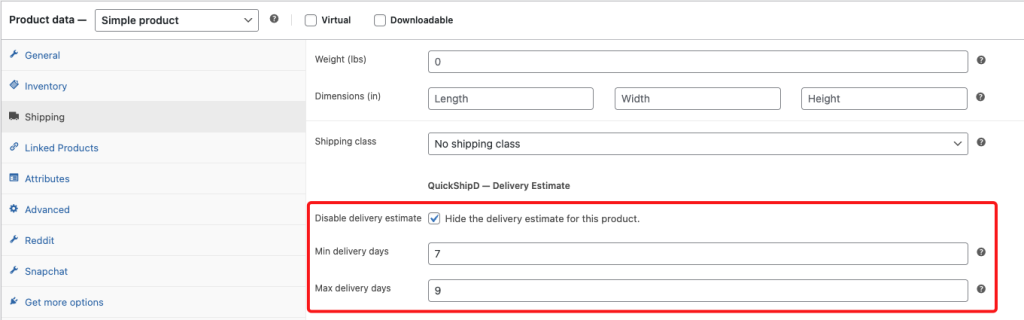
| 🚧 IMPORTANT Never let a store-wide “fast” estimate apply to a product you know will take longer. One bad experience on a slow item does more damage to trust than a slightly longer estimate ever will. |
Keep Holidays and Non-Delivery Days Out of the Equation
A surprising number of timing-related returns trace back to a simple miscalculation: an estimate that didn’t account for a public holiday or a weekend your warehouse doesn’t ship on. The math looks right until you check a calendar.
QuickShipD’s holiday list and non-delivery day toggles handle this automatically once configured, so your calculated window already skips the days you don’t ship — no manual date-checking required each time you add a holiday.
Fewer Surprises, Fewer Returns
Timing-related returns almost always trace back to a gap between what the customer assumed and what actually happened. Close that gap before the order is placed, and you remove the reason for the return before it exists.
QuickShipD calculates and displays that accurate window automatically, with per-product overrides for the exceptions that need them.
Related Reading
- How to Show Delivery Estimates for International Orders
- How Seasonal Weather Disruptions Should Change Your Delivery Estimates
- How to Handle Delivery Estimates for Pre-Order Products
- Delivery Date Estimates for Dropshipping Stores: What's Realistic?
- The Real Cost of Post-Purchase Anxiety in eCommerce