
Your domestic delivery estimate is dialed in — accurate, reliable, converting well. Then an order comes in from overseas, and you realize the same window you’ve been showing everyone doesn’t remotely apply. Customs, longer transit, and international carrier quirks all break the math your domestic estimate was built on.
International orders need their own approach to delivery estimates, not a wider version of your domestic one. Here’s what actually changes, and how to handle it without overcomplicating your setup.
What Makes International Delivery Estimates Different
Three things typically add time to an international order that your domestic estimate never has to account for: longer carrier transit by default, customs clearance (which can range from a few hours to several days and is largely outside your control), and different non-delivery days depending on the destination country’s holidays.
Customs clearance is the least predictable of the three. It’s not unreasonable to add a buffer specifically for this, rather than assuming every international shipment clears customs as fast as your best-case scenario.
| 🪧 IMPORTANT Never apply your domestic delivery window to international orders by default. It’s one of the fastest ways to turn a reasonable international customer into a frustrated one who assumed your published estimate applied to them too. |
The Practical Way to Handle This in QuickShipD
QuickShipD’s delivery estimate settings apply store-wide or per product, not per shipping destination. For most stores, the practical approach is setting your global minimum and maximum delivery days around your domestic shipping — your primary customer base — and using per-product overrides for items you know ship mostly or entirely internationally.
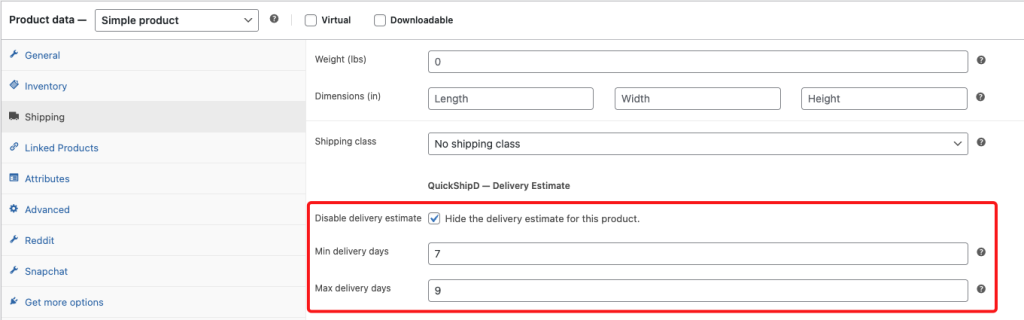
If most of your catalog ships both domestically and internationally, a simpler workaround is widening your global maximum delivery day setting enough to cover your slower international shipments honestly, and clarifying in your product description or shipping policy that customers outside your primary region should expect the higher end of that range.
| 💡 PRO TIP Add a short note directly beneath your delivery estimate for stores with meaningful international traffic: “International orders may take longer due to customs processing.” It sets the right expectation without needing a separate calculation system. |
Accounting for Destination-Specific Holidays
Your holiday list in QuickShipD reflects your own shipping calendar — the days your warehouse doesn’t dispatch. It won’t automatically know that a shipment to another country might sit at customs longer around a local holiday there. This is a genuine limitation, and the honest fix is building in a slightly wider buffer for your international estimate rather than expecting the software to track every country’s calendar.
Widen the Window, Don’t Widen the Promise Blindly
International orders need a genuinely different delivery estimate, not your domestic number with extra optimism attached. Whether that means per-product overrides, a wider global window, or a clarifying note, the goal is the same: an honest number for a genuinely different situation.
QuickShipD’s per-product overrides give you the flexibility to handle this without overhauling your entire delivery setup.