
A pre-order product doesn’t have a stock problem — it has a not-made-yet problem, and that changes what a delivery estimate needs to say. Showing your standard “Get it in 3-5 days” on a product that won’t even exist for another six weeks isn’t just inaccurate, it’s a promise you know is wrong the moment you publish it.
Here’s how to handle delivery estimates for pre-orders so customers know exactly what they’re actually waiting for.
Why Standard Estimates Don’t Work for Pre-Orders
A normal delivery estimate assumes the product already exists and is ready to ship once ordered. A pre-order breaks that assumption entirely — the countdown a customer actually cares about starts from the product’s release or production date, not from the moment they place the order.
If your delivery estimate plugin calculates from “order placed today,” it has no way of knowing the product won’t be ready for weeks, and will confidently display a window that’s simply wrong.

| 🚧 IMPORTANT Never let a standard delivery estimate display on a pre-order product page. It sets an expectation your fulfilment process can’t possibly meet, and the gap between promise and reality only grows the further out the release date is. |
The Practical Fix: Disable and Replace
In QuickShipD, use the per-product “Disable delivery estimate” checkbox in the Shipping tab for any pre-order product. This stops the standard calculation from showing on a product where it doesn’t apply.
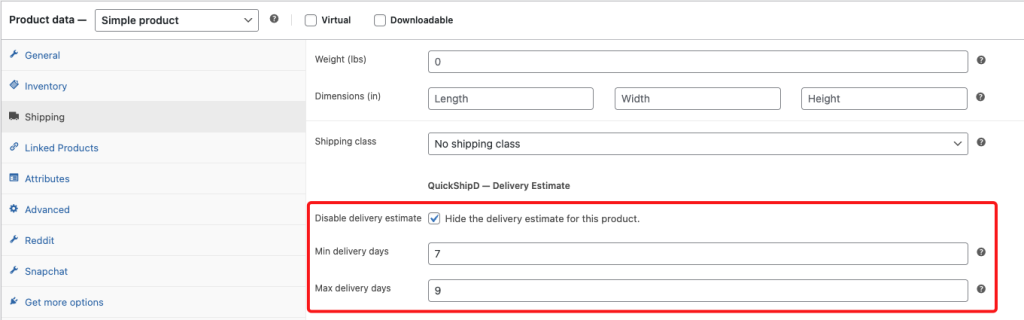
In its place, add a specific, honest note in the product description: “Expected release: June 15. Orders ship within 2 business days of release.” This gives customers the actual information they need, phrased around the release date rather than a calculation that doesn’t apply.
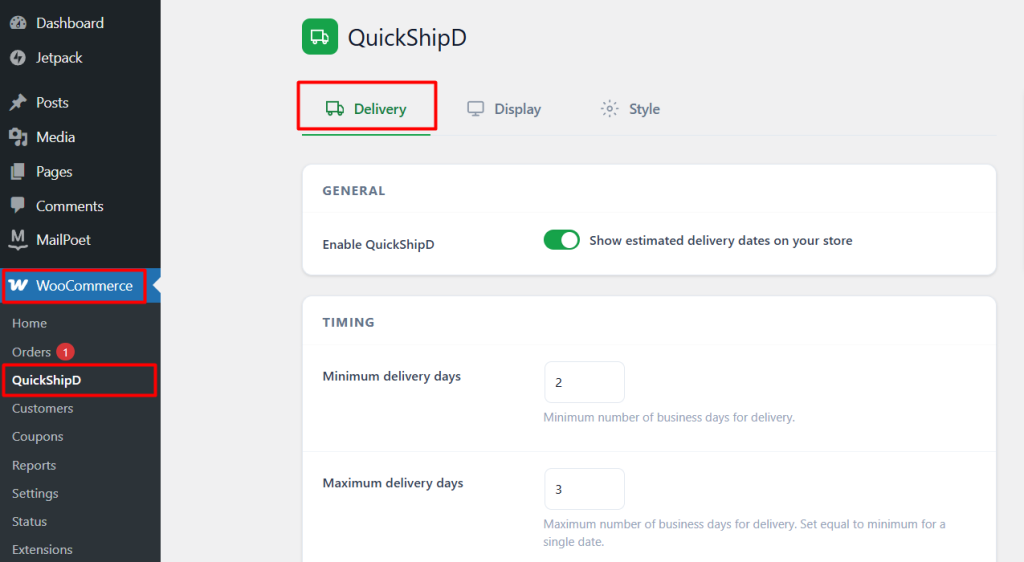
| 💡 PRO TIP The moment a pre-order product actually releases and moves to normal fulfilment, re-enable the standard delivery estimate and remove the release-date note. QuickShipD will calculate an accurate window immediately since it’s dynamic, not manually set. |
Match the Message to the Product’s Actual State
A pre-order needs a release-date message, not a standard delivery calculation — the two answer completely different questions. Disabling the estimate and stating the real timeline directly keeps the promise honest.
QuickShipD’s per-product disable option makes this a quick toggle rather than a workaround.