
A B2B buyer ordering 500 units isn’t making the same decision as a consumer buying one. They’re often planning around a project timeline, coordinating with their own downstream customers, and need a delivery estimate that reflects bulk production and freight realities — not the quick 2-3 day window built for single-unit retail orders.
Here’s how to think about delivery estimates differently for wholesale and bulk orders on a WooCommerce store serving both B2C and B2B customers.
Why Bulk Orders Break a Standard Estimate
A delivery estimate calibrated for a single retail unit usually assumes it’s already sitting in stock, ready to pick and pack. A bulk order for hundreds of units might require additional production time, palletized freight instead of standard parcel shipping, or coordination with a logistics provider entirely separate from your everyday carrier.
Applying your standard 2-3 day retail estimate to a 500-unit order isn’t just optimistic — it’s usually not even the right kind of shipping method being described.
| 🎯 NOTE Not every store selling to businesses needs a different approach — if your B2B orders ship the same way and on the same timeline as retail ones, your standard estimate already covers them. This matters most when bulk orders genuinely trigger a different fulfilment process. |
Handling Quantity-Based Timeline Differences
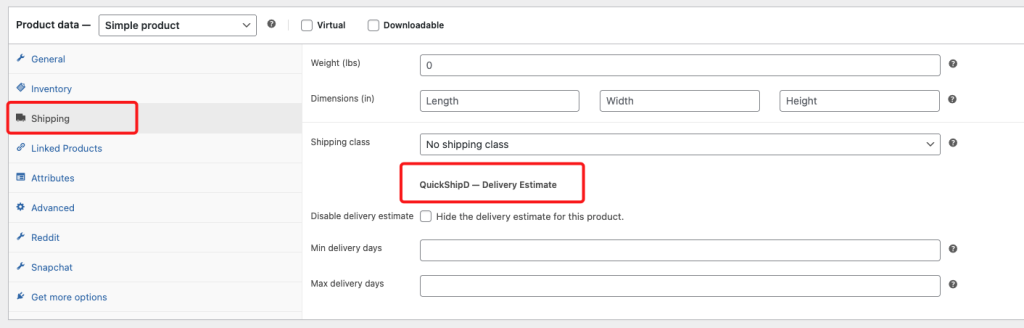
If wholesale and bulk products are set up as distinct listings from your retail catalog, per-product delivery day overrides let you show a realistic bulk-order timeline directly on that listing, separate from your faster retail default.

The honest limitation: QuickShipD’s estimate doesn’t automatically detect order quantity and switch calculations mid-order — it’s not built to say “2 days for orders under 10 units, 2 weeks for orders over 100.” For stores where quantity genuinely changes the timeline, a clear note on the wholesale product page or in your B2B terms is the more reliable approach than expecting the plugin to detect it automatically.
| 💡 PRO TIP If you run a dedicated wholesale portal or minimum order quantity setup, disable the standard delivery estimate there and replace it with a direct statement of your typical bulk lead time — clearer than trying to force a per-unit calculation to fit. |
Different Order, Different Promise
Bulk and wholesale orders often genuinely operate on a different timeline than retail units, and the delivery messaging should reflect that rather than forcing one calculation to cover both. Per-product overrides and clear wholesale-specific copy get you most of the way there.
QuickShipD’s per-product settings give you the flexibility to set a genuinely different estimate for listings that need it.