
.Rush orders are the moment of truth for any fulfilment operation. A customer is willing to pay a premium to get their order faster — but that only works if your store can actually deliver on that promise, and if the delivery estimate shown reflects the expedited timeline rather than your standard one.
What Makes Rush Orders Complicated
The challenge with rush orders isn’t just speed — it’s accuracy of communication. If you offer a ‘Next Day Delivery’ option but display the same delivery estimate as standard shipping, customers will either not notice the value of the upgrade or they’ll expect the faster timeline and get confused when the estimate doesn’t reflect it.
Conversely, if you show an aggressive express delivery estimate but your fulfilment operation can’t reliably hit it, you’re setting yourself up for disappointed customers and refund requests.
Approach 1: Per-Product Overrides for Express Items
If you offer express variants of specific products — or if you have a small set of products that you can reliably dispatch same-day — use per-product delivery day overrides to show a tighter delivery window for those specific items. QuickShipD’s per-product overrides handle exactly this, letting you set a faster window on individual products without changing your store-wide default.
In the WooCommerce product editor, under the Shipping tab, QuickShipD lets you set a minimum and maximum delivery day specific to that product.
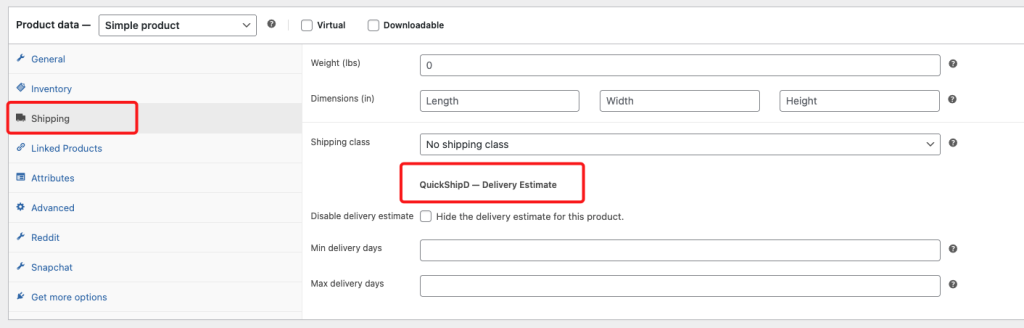
An express-eligible product might show 1–2 days while your standard products show 3–5. The customer can see the difference immediately, which reinforces the value of the premium option.
Approach 2: Adjusting Global Settings for Rush Periods
If you run time-limited express shipping promotions — a ‘same-week delivery guaranteed’ campaign over a specific period — you can temporarily reduce your global minimum and maximum delivery days in QuickShipD’s Delivery tab for the duration. Update them before the campaign starts, and revert when normal operations resume.
Pair this with an earlier order cutoff time if you’re doing same-day or next-day dispatch — and make sure that cutoff is real. If you promise same-day dispatch for orders before 12:00 PM, set the cutoff to 12:00 PM in your QuickShipD settings.
Approach 3: Honest Communication When You Can’t Offer Rush
If rush orders aren’t operationally feasible for your store, the most important thing is not to display estimates that imply they are. Don’t show a 1–2 day estimate if the fastest you can genuinely ship is 3 days. It’s far better to be honest — ‘We ship all orders within 2 business days, with delivery typically in 5–7 days’ — than to make a promise you can’t keep.
| IMPORTANT Only display rush or express delivery estimates if your operation can consistently meet them. A missed express delivery creates a disproportionately negative customer experience compared to a missed standard delivery — the customer paid more and has higher expectations. Never adjust your cutoff time or delivery days to look faster than you actually are. |
Rush order handling is ultimately an operational problem that delivery date display makes visible. Get the operations right first, then configure your estimates to reflect reality accurately.