
We publish QuickShipD. It is one of the five plugins below. Read this page knowing that.
Three things keep it honest. The ordering rule is stated before the list, not chosen after it. Every figure comes from a public WordPress.org listing or a vendor pricing page. And QuickShipD has the smallest install base here by a factor of over 200. We say that in its own entry rather than burying it.
Search for a WooCommerce estimated delivery date plugin and most lists hand you a delivery date picker instead. Those are different products.
A picker lets a customer choose a date at checkout. An estimated delivery date plugin calculates a date and shows it on the product page, before the customer decides to buy.
We checked nine plugins commonly recommended for this. Five actually display an estimate, and four are pickers or carrier integrations. For the full picture, including the pickers and scheduling systems excluded here, see our complete comparison of every WooCommerce delivery date plugin.
Of the five, WPC Estimated Delivery Date is the one most stores should try first. It has 7,000+ active installs and per-shipping-method dates in the free tier. The premium upgrade is $29 one-time, not annual.
What is a WooCommerce delivery integration provider?
It is not an official WooCommerce term, which is most of why it causes confusion. People searching it usually mean one of three different things, and those need three different products:
- A plugin that displays delivery information. It shows an estimated date, a countdown, or a date picker on your storefront. Free or inexpensive, installed in minutes, no external account. This is the category compared on this page.
- A carrier integration. It connects your store to USPS, UPS, FedEx or DHL to pull live rates and real transit times per address. Needs carrier API credentials and usually a paid licence. PluginHive, at number five below, is the example here.
- A fulfilment or 3PL provider. An actual company that warehouses your stock and ships it for you. Not a plugin at all, and nothing in the WordPress directory solves it.
If you came here wanting a delivery date on your product page, you want the first kind, and you do not need to pay for it. If you need rates and timings that change by postal code, you want the second. If the real problem is that parcels are piling up in your spare room, you want the third and none of this page will help.
Quick comparison: the 5 plugins that display an estimate
| Plugin | Best for | Free tier | Active installs | Rating (reviews) | Premium | 3-year cost |
|---|---|---|---|---|---|---|
| WPC Estimated Delivery Date | Most stores | Full, minor gaps | 7,000+ | 4.0 (9) | $29–$99 one-time | $29 |
| Estimated Delivery for WooCommerce | Multivendor marketplaces | Full, no upsell | 1,000+ | 5.0 (13) | None | $0 |
| QuickShipD | Countdown urgency | Full, no upsell | 30+ | 5.0 (6) | None | $0 |
| Estimated delivery date per product | Per-product prep times | Capped at 5 holidays | 300+ | 4.2 (82) | $34 | $34 |
| PluginHive Estimated Delivery Date | Carrier-based estimates | None | Not on WordPress.org | — | $69/year | $207 |
Install counts and ratings from each plugin’s WordPress.org listing: WPC, Estimated Delivery for WooCommerce, and Estimated delivery date per product read 17 August 2026; QuickShipD‘s figures refreshed 2 September 2026. Three-year cost assumes a single site and is explained under methodology.
How we compared these
We started with nine plugins that appear repeatedly in this category. Then we applied one filter: does the plugin show a calculated delivery estimate before purchase? Plugins that only let a customer pick a date at checkout were excluded. All four are named at the end, with reasons.
For each survivor we recorded six figures from WordPress.org: active installs, average rating, review count, version, last-updated date and tested-up-to version. Pricing came from each vendor’s own page, not from a reseller. From those we computed three numbers no directory shows you:
- Three-year cost of ownership. Annual licences multiplied by three. One-time purchases counted once. A $69/year plugin is not “$69.” It is $207 before you have finished three Christmases with it.
- One-star share. One-star reviews as a percentage of all reviews. A 4.3 average hides how many people had a bad time.
- Reviews per 1,000 installs. Thin review coverage means thin public evidence, whatever the star rating says.
The ordering rule. Plugins are grouped by how much of the job the free tier does. Complete free tiers first, capped ones next, paid-only last. Inside each group, plugins are ordered by install count.
That places our own plugin third: above the capped and paid options, below two free rivals with far more adoption. Install counts stay in the table so you can weight them differently.
1. WPC Estimated Delivery Date
Best for: most WooCommerce stores that want dates on the product page without a subscription.
- Active installs: 7,000+ · Rating: 4.0 from 9 reviews · Version: 3.0.0 · Updated: ~4 weeks ago · Tested to: WordPress 7.0.3 · Premium: $29–$99, one-time · 3-year cost: $29
WPC Estimated Delivery Date calculates a delivery window and shows it on product and shop pages, updating with the chosen shipping method and address.
That last part matters more than anything else here. Per-shipping-method accuracy is what separates a real estimate from a static “ships in 3–5 days” label. WPC includes it free.
Premium adds two narrow things: multiple skipped dates via a date picker, and an extra time line that adds a shipping day past a cutoff.
Where WPC Estimated Delivery Date falls short
Nine reviews across 7,000+ installs works out to 1.3 reviews per 1,000 installs – the thinnest evidence base here by a wide margin. CodeRockz’s picker manages 56 per 1,000.
Plenty of people run WPC. Almost none have written about it publicly, so the 4.0 rests on very little.
There is no countdown timer in either tier.
Cost
Free, with premium from $29 as a one-time purchase that includes lifetime updates and one year of support. Over three years it costs $29 against PluginHive’s $207 – an 86% difference for a comparable job.
WPC is the clear default for most stores. No other plugin here combines a large install base, free per-shipping-method dates and a one-time price.
2. Estimated Delivery for WooCommerce
Best for: multivendor marketplaces running Dokan, WC Marketplace or WCFM.
- Active installs: 1,000+ · Rating: 5.0 from 13 reviews · Version: 2.0.0 · Updated: ~5 months ago · Tested to: WordPress 6.9.6 · Premium: none · 3-year cost: $0
Estimated Delivery for WooCommerce shows estimated or guaranteed delivery dates on products. You can configure non-delivery days, holiday dates, date formats and display locations. Dates appear on product pages, cart, checkout and order confirmations. An [estimate_delivery] shortcode handles custom placement.
The multivendor support is the real differentiator. None of the other four advertise Dokan, WC Marketplace or WCFM compatibility. Per-vendor estimates are otherwise awkward to build.
Where Estimated Delivery for WooCommerce falls short
Tested up to WordPress 6.9.6 while the current release is 7.0.4, and last updated roughly five months ago. That is the largest maintenance gap of the five – not abandoned, but the one most likely to be next.
It also declares PHP 5.0 support, a version that reached end of life in 2004.
Cost
Nothing, at any tier. There is no premium version and no upsell, only an optional donation. Three-year cost: $0.
For a marketplace running Dokan or WCFM, this is the only sensible pick here. For a single-vendor store, the WordPress version lag makes WPC safer.
3. QuickShipD – Estimated Delivery Date for WooCommerce
Best for: stores wanting countdown urgency without paying for it.
This is our plugin. It sits third because it shares the top group’s complete free tier. It sits no higher because 30+ installs is the smallest number on this page, by a long way.
- Active installs: 30+ · Rating: 5.0 from 6 reviews · Version: 1.0.6 · Updated: ~2 weeks ago · Tested to: WordPress 7.0.4 · 3-year cost: $0
QuickShipD shows a delivery window on product, cart and checkout pages. The window comes from a configurable minimum and maximum, with weekends and holidays excluded.
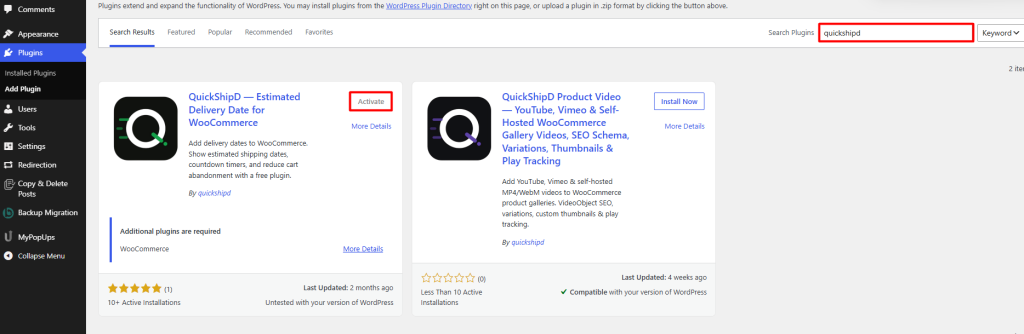
It also adds a live countdown (“Order within 4h 12m 08s”), per-shipping-method estimates, per-product overrides, recurring yearly holidays and block-checkout support. All of it is free, with no paid tier.
The countdown is the one thing nothing else here offers free. WPC has none in either tier.
Where QuickShipD falls short
Ten installs and four reviews. WPC has roughly 700 times the install base. Estimated Delivery for WooCommerce has 100 times.
If you want a plugin proven across thousands of stores, QuickShipD is not it yet. No amount of feature comparison changes that.
QuickShipD is a reasonable pick if you want a countdown timer and per-shipping-method dates without paying, and you are comfortable running a young plugin.
4. Estimated delivery date per product for WooCommerce
Best for: stores where each product has a different preparation time.
- Active installs: 300+ · Rating: 4.2 from 82 reviews · Version: 4.11.46 · Updated: 6 days ago · Tested to: WordPress 7.0.3 · Pro: $34 · 3-year cost: $34
Estimated delivery date per product adds preparation days to shipping days, per product. The result appears on shop, product, cart and checkout pages, with AJAX updates. If you sell both stocked and made-to-order goods, that per-product preparation time is the feature missing everywhere else.
It also carries 82 reviews on 300+ installs. That is 273 reviews per 1,000 installs, the densest coverage in this comparison. Its 4.2 rests on more public feedback than WPC’s 4.0, despite a fraction of the installs.
Where Estimated delivery date per product falls short
The free tier caps holidays at five dates. For most retailers that runs out inside a single year. Our weekend and holiday exclusion guide covers how many dates a real calendar needs.
That makes the free version a trial rather than a solution. Unlimited holidays, cutoff times, per-product overrides and custom date formats are all Pro.
The 300+ install count is also the second-smallest here – only QuickShipD’s is lower.
Cost
Free with a five-holiday limit. Pro costs $34. Confirm whether that is one-time or annual before relying on the three-year figure above.
Worth considering if you already handle variable preparation times by hand. The five-holiday cap is the only thing standing between you and shipping it.
5. PluginHive Estimated Delivery Date
Best for: stores whose estimates need to come from live carrier transit times.
- Active installs: not listed on WordPress.org · Price: $69/year, single site · 3-year cost: $207
PluginHive ties delivery estimates to carrier transit data, not to a window you configure by hand. That matters for a store shipping internationally across several carriers, where a hand-configured window is a guess and a carrier-derived one is not.
Where PluginHive Estimated Delivery Date falls short
PluginHive has no WordPress.org listing, so there is no install count, no public rating and no independent reviews to check. Everything you know about it comes from PluginHive.
At $69 per year it is the most expensive option here. Three years costs $207 – seven times WPC’s premium, for a feature set most domestic stores will not use.
PluginHive does offer a 30-day money-back guarantee. The plugin also keeps working after a licence lapses – you lose updates and support, not the feature.
For an international store on multiple carriers, where a wrong estimate costs a support ticket, $207 over three years is cheap. For a domestic store with one shipping method, it is $207 wasted.
Which of these show a shipping countdown timer?
A countdown turns a static date into a decision. “Order within 4h 12m for dispatch today” gives a shopper a reason to buy now rather than bookmark the page, and it is the scarcest feature in this whole category.
| Plugin | Cutoff countdown timer | Available in |
|---|---|---|
| WPC Estimated Delivery Date | No | Neither free nor premium |
| Estimated Delivery for WooCommerce | No | — |
| QuickShipD | Yes | Free tier |
| Estimated delivery date per product | No | Pro adds cutoff times, but no visible timer |
| PluginHive Estimated Delivery Date | No | — |
One honest caution before you add one. A countdown only works if the cutoff behind it is real. If your timer hits zero at 2pm and you still pack that order at 5pm, you have taught your repeat customers that the urgency is theatre — and they are the customers worth keeping. Set the cutoff to the time your packing actually stops, then let the timer tell the truth.
If a countdown is the only feature you are missing, our guide to adding an order cutoff countdown to WooCommerce covers doing it alongside whichever estimate plugin you already run.
Which estimated delivery date plugin should you choose?
- You want a reliable countdown timer and will not pay for one: QuickShipD, accepting that it is the youngest plugin here.
- A typical single-vendor store: WPC Estimated Delivery Date. Largest install base with free per-shipping-method dates.
- A Dokan, WCFM or WC Marketplace marketplace: Estimated Delivery for WooCommerce, accepting the WordPress version lag.
- Products with different preparation times: Estimated delivery date per product, budgeting $34 for Pro because five holidays will not last. If you’d rather set this up yourself first, our step-by-step guide to per-product delivery times covers both the free code method and the plugin route.
- International shipping across several carriers: PluginHive, at $207 over three years.
If you are undecided, install WPC Estimated Delivery Date. It costs nothing to try and covers the feature that matters most. Its $29 one-time upgrade is the cheapest path to a complete setup. Stuck on whether to upgrade? Read our free versus paid comparison.
The four plugins we excluded, and why
Each of these appears in “estimated delivery date” roundups. None shows a calculated estimate on the product page without a second plugin.
Order Delivery Date for WooCommerce (Tyche Softwares) – 10,000+ installs and 4.3 from 61 reviews. The most-installed plugin in this space, and a checkout date picker. Its own description points you to a separate Product Delivery Date LITE plugin for product-page display.
One figure is worth pulling out. Seven of its 61 reviews are one-star – an 11.5% one-star share. That is the highest of any plugin we looked at, and roughly triple what the 4.3 average suggests.
Delivery & Pickup Date Time for WooCommerce (CodeRockz) – 5,000+ installs and 4.9 from 281 reviews. That is the strongest review record in this whole comparison. Also a checkout picker, with time slots and pickup locations. If you actually need customers to choose a delivery date, look at this rather than anything above.
YITH WooCommerce Delivery Date – paid only, no WordPress.org listing. YITH reports 7,609 customers and 4.5 from 92 reviews on its own site. A scheduling product, not an estimate display.
Iconic Delivery Slots – paid only, and a slot picker by design. Its product URL now redirects to Liquid Web. Confirm the product’s status before buying.
If the category distinction is still fuzzy, we wrote a longer breakdown of the three types of WooCommerce delivery date plugin and the problem each one solves.
What to do next
Install one plugin on a staging site, then configure a single shipping method end to end before touching production.
The step that catches people out is not installation but excluding weekends and holidays correctly. An estimate promising Sunday delivery is worse than no estimate at all.
After that, decide whether each shipping method needs its own window. Our guide to different delivery times per shipping method covers the setup, without contradicting your carrier’s real transit times.
Frequently asked questions
Which WooCommerce estimated delivery date plugins are completely free?
Two. Estimated Delivery for WooCommerce (1,000+ installs) and QuickShipD (30+ installs). Neither has a paid tier. WPC and Estimated delivery date per product have free versions with real limits. Our free versus paid breakdown covers where each one stops.
What is a WooCommerce delivery integration provider?
It is an informal term covering three different things. It could mean a plugin that displays delivery information on your storefront, a carrier integration that pulls live rates and transit times from USPS, UPS, FedEx or DHL, or a third-party fulfilment company that ships your orders for you.
Most people searching it want the first, which is what this page compares.
What’s the difference between an estimated delivery date plugin and a delivery date picker?
An estimated delivery date plugin calculates a date and shows it before shoppers buy. A picker lets the customer choose a date at checkout – see whether customers can pick their delivery date if that is the one you need. Most roundups mix the two, which is why Tyche’s picker tops lists for a query it does not answer.
Do estimated delivery date plugins slow down WooCommerce?
Usually not much. The calculation is arithmetic on dates, done server-side. One exception: per-shipping-method estimates that update on the fly add an AJAX request when the shopper switches method.
Which of these work with the block-based cart and checkout?
QuickShipD states full block-checkout compatibility in its listing. Check the others yourself before installing. Block-checkout support is the most common gap in this category, and the most likely to have changed since this page was updated.
Can I show a countdown timer with the free version?
Only with QuickShipD. WPC Estimated Delivery Date has no countdown in either its free or premium tier, and neither do the other three.
Is a plugin with 10,000 installs safer than one with 300?
Not automatically. Order Delivery Date has 10,000+ installs and an 11.5% one-star share. Estimated delivery date per product has 300+ installs and 82 reviews behind a 4.2. Install count measures reach. Review density measures whether anyone will tell you what went wrong.
Do any of these pull real carrier transit times?
Only PluginHive, at $69 per year. The other four calculate from windows you configure by hand.