
Yes — but it’s worth understanding the difference between showing customers an estimated delivery date and letting them choose a specific one. Both improve the shopping experience, but they solve different problems, need different plugins, and commit you to very different things operationally.
Most stores that go looking for a date picker actually need an estimate. Here is how to tell which one you are.
| If this is true of your store… | You want… |
|---|---|
| You hand parcels to a national carrier | An estimate. The carrier picks the day, not you |
| You drive your own deliveries locally | A date picker. You control the day, so you can promise it |
| You sell perishables, flowers, cakes, or event items | A date picker. The date is part of the product |
| Customers just want to know when it turns up | An estimate. Asking them to choose adds a decision they did not want |
| You cannot cap how many orders land on one day | An estimate. A picker without capacity limits oversells |
Showing vs. Choosing: What’s the Difference?
Displaying an estimated delivery date tells the customer when their order will most likely arrive based on your processing and shipping schedule. It’s automatic, requires no customer input, and works for every order.
Letting customers pick a delivery date means they select a specific day they want their package to arrive — and you commit to meeting that. This requires coordination with your fulfilment process and is much more operationally complex. It’s commonly used by local delivery businesses, food stores, florists, and businesses where the customer’s preferred arrival time is central to the purchase.
The distinction that matters is the direction of the promise. An estimate is you forecasting to the customer, and you can revise it. A picker is the customer setting a deadline you then have to hit. One is a best guess offered in good faith; the other is a commitment with a date attached.
What a Date Picker Actually Requires
The calendar is the easy part. What makes a date picker work — or quietly ruin a Saturday — is the scaffolding behind it:
- A capacity limit per date. Without one, forty people can choose the same Saturday and you will disappoint most of them. This is the single most common failure.
- A minimum lead time. Stops someone ordering at 11pm and selecting tomorrow morning.
- Blocked dates. Holidays, closures, and any day you genuinely cannot deliver — kept current, not set once and forgotten.
- A cutoff that matches reality. If your picker offers next-day but your packing stops at 2pm, that needs to be enforced in the calendar, not in a note nobody reads.
| 🚧 IMPORTANT Do not add a date picker to a store that ships via a national carrier. You are letting a customer choose a date no one in your business controls, which converts a soft estimate into a hard promise you will sometimes break — and a broken chosen date annoys people far more than a missed estimate. |
For Showing Estimated Delivery Dates: Use QuickShipD
If your goal is to show customers when their order will arrive — automatically, based on your shipping schedule — QuickShipD handles this without any customer input required. You configure your delivery days and schedule once, and every product page, cart, and checkout automatically displays an accurate delivery window.
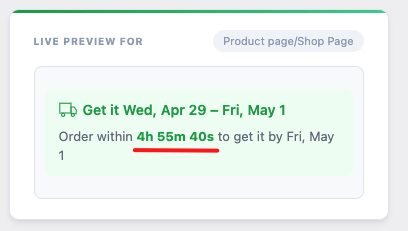
Customers see ‘Get it Thu, May 14 – Mon, May 18’ with a live countdown to the order cutoff time. They can see whether they’ll receive the order in time for what they need it for, and that information alone is enough to increase conversions and reduce cart abandonment.
For Letting Customers Choose a Specific Date
If you genuinely want customers to select a delivery date from a calendar — common for local delivery, subscription boxes, or event-based products — you’ll need a dedicated date-picker plugin. QuickShipD does not do this, deliberately; it is built around calculating and showing a date rather than collecting one.
When comparing pickers, check for the four things listed above — per-date capacity, minimum lead time, blocked dates and an enforced cutoff. A plugin that only adds a calendar field and leaves the rest to you is not saving you work, it is moving the work to your inbox. Time slots and pickup locations are worth having if you run your own vehicles, and irrelevant if you do not.
Our breakdown of the three types of WooCommerce delivery date plugin covers which products fall into which category, and the tested plugin roundup names the specific pickers worth looking at.
Can You Offer Both?
Yes, and some stores should. A bakery that posts nationally and also delivers locally has two genuinely different customers: one wants to know when the parcel lands, the other wants their cake there on Saturday morning.
The thing to avoid is two plugins both writing delivery text to the same product page, which produces either duplicated messaging or whichever one loads last. Decide which tool owns which surface — product page, cart, checkout, confirmation email — and turn the other one off there.
Which Approach Is Right for Your Store?
For the vast majority of eCommerce stores — those shipping physical products via carriers like USPS, UPS, FedEx, Royal Mail, or similar — showing accurate estimated delivery dates is what customers need. They don’t need to pick a date; they need to know when to expect delivery so they can decide whether to order.
| 🎯 QUICK DECISION GUIDE Show estimated delivery dates (QuickShipD) if: you ship via carriers on a standard schedule and customers just need to know when to expect their order. Let customers pick a date if: you do local delivery, bespoke fulfilment, or your product is event-specific and the delivery date is part of the product itself. |
Most WooCommerce stores need the first option. It’s simpler, requires no extra operational work, and gives customers the information they actually need to complete a purchase confidently.
Frequently asked questions
Can customers pick their own delivery date in WooCommerce?
Not with WooCommerce alone — it has no delivery date field of any kind out of the box. A date-picker plugin adds a calendar to the checkout, and a delivery estimate plugin instead calculates and displays a date without asking the customer anything.
Should I let customers choose a date or just show an estimate?
Show an estimate unless you control the vehicle. If a national carrier decides which day the parcel arrives, letting a customer pick a date creates a promise nobody in your business can keep. If you deliver locally yourself, a picker is the better fit.
Does QuickShipD let customers choose a delivery date?
No, and that is deliberate. It calculates and displays a delivery window automatically. If customer-selected dates are core to your business, you need a scheduling plugin instead — the two solve different problems.
What happens if too many customers pick the same delivery date?
Without a per-date capacity limit, nothing stops them — you simply end up with more orders than you can fulfil that day. Any picker plugin worth using lets you cap orders per date and close a date once it is full.
Can I use a date picker and a delivery estimate together?
Yes, if they serve different products or shipping zones. Make sure only one of them displays on any given page, or customers see two competing delivery messages and trust neither.