
Manually calculating and updating delivery dates for every product is the kind of job that sounds manageable until you have fifty products, a seasonal schedule, and a sale coming up. Automation isn’t a luxury for WooCommerce stores — it’s the only way to keep delivery estimates accurate at scale.
Here’s what automated delivery date calculation looks like, and what it takes to set it up.
What ‘Automated’ Actually Means
An automated delivery date calculation doesn’t require you to enter a specific date for each product. Instead, you configure your rules once — delivery days, cutoff time, non-working days, holidays — and the plugin calculates the correct delivery window for every order automatically, in real time, based on the current date and time when the customer views the page.
This means the estimate is always accurate. A customer who visits your product page at 9am on a Tuesday sees a different calculated arrival date than one who visits at 4pm on a Friday — because the time, day of week, and remaining time before cutoff all factor into the calculation.
Setting Up Automated Calculations With QuickShipD
QuickShipD automates delivery date calculations based on the rules you configure in the Delivery tab:
- Minimum and maximum delivery days — the total window from order placed to delivery arrived
- Order cutoff time — the daily deadline for same-day dispatch; orders after this are calculated from the next business day
- Exclude weekends — automatically skips Saturday and Sunday when calculating delivery dates
- Non-delivery days — individual day toggles for any weekday you don’t dispatch
- Holidays — a field where you can enter specific dates to exclude from delivery calculations
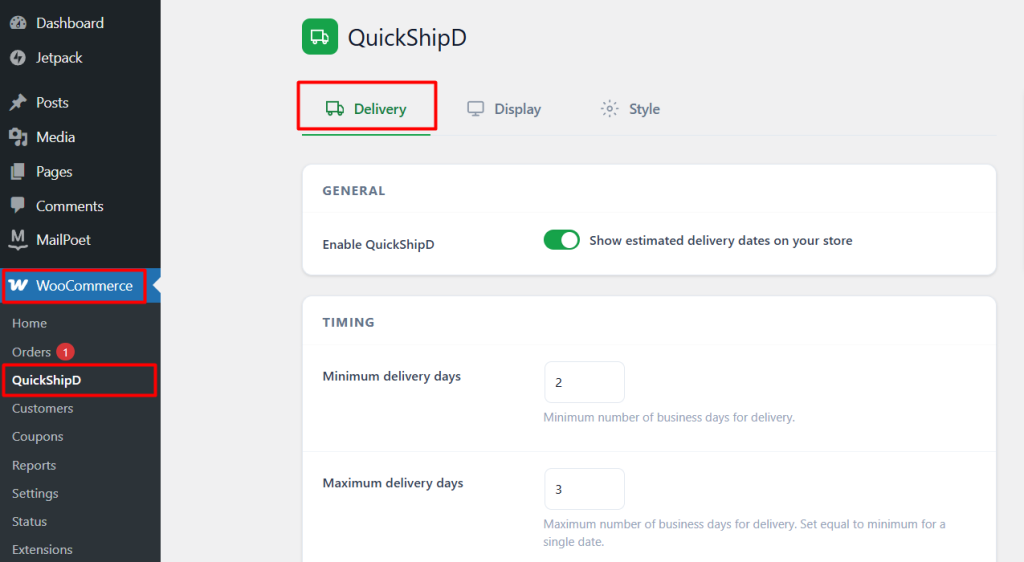
Once configured, you don’t touch these settings again unless your shipping schedule changes. Every product page, shop page, cart, and checkout automatically displays the correctly calculated delivery window, updated in real time.
What Changes Automatically vs. What You Update Manually
The following update automatically without any action from you:
- The delivery dates displayed (they recalculate based on the current date every time the page loads)
- The countdown timer to your cutoff time (counts down in real time)
- Date calculations that skip weekends and holidays you’ve pre-entered
The following you’ll want to update manually when circumstances change:
- Your minimum/maximum delivery days if your carrier changes transit times
- Your holiday list at the start of each year or before a public holiday
- Your cutoff time if your dispatch schedule changes
| 💡 PRO TIP Schedule a 10-minute recurring task at the start of each month to check your delivery settings and add any upcoming public holidays to your holiday list. This keeps your automated calculations accurate year-round without requiring any ongoing effort. |
One-time configuration, accurate ongoing automation. That’s the value of a dedicated delivery estimate plugin over manually writing dates into product descriptions.