
Every November, the same pattern plays out: order volume spikes, carriers get backed up, and the delivery estimate that worked perfectly in October quietly stops being true.
Customers don’t grade you on a curve for peak season. A late order in December feels exactly as disappointing as one in June, and often worse, because the stakes are usually higher.
Here’s how peak-season delays actually affect trust, what those carrier delay messages mean, and what to do with your delivery estimates before the rush hits rather than during it.
Why Peak Season Breaks Estimates That Normally Work Fine
Your delivery estimate is calculated from your normal processing time and typical carrier transit — numbers that hold up under normal order volume.
Peak season changes both inputs at once. Your own fulfilment queue gets longer, and carriers experience their own volume surge on top of yours.
An estimate that was accurate in a normal month can quietly become optimistic in December without you changing a single setting, simply because the conditions underneath it changed.
| 🎯 NOTE Customers are generally willing to accept longer delivery windows during widely known busy periods like the December holidays — they just need to be told about it before ordering, not after. |
What “Due to Operating Conditions, Your Package May Be Delayed” Actually Means
This is the message your customers will screenshot and send to your support inbox during peak season, so it is worth knowing exactly what it says and does not say.
It is a carrier status — most commonly seen on UPS tracking — meaning something inside the carrier’s own network is slowing the parcel down. It is generic by design, because the carrier is describing a condition rather than a specific incident.
Crucially, it does not mean the package is lost, misrouted or cancelled. The parcel is still in the network and still scheduled for delivery; the carrier is simply signalling that its original timeline may slip.
What typically triggers it
- Volume surges. More parcels entering a sorting hub than it was staffed to handle that day — the classic peak-season cause.
- Weather. Snow, storms or flooding closing or slowing a facility, or grounding air freight.
- Equipment and sorting faults. Conveyor or scanner failures at a distribution centre create a backlog that takes days to clear.
- Staffing shortfalls. Not enough drivers or sorters for the volume actually arriving.
- Address or customs queries. A parcel held while an address is clarified or a cross-border shipment clears.
How long it usually lasts
Most of these delays resolve within a few days once the parcel reaches a facility that can route it properly. Two to five days is the common range for a domestic shipment.
During the December peak, or when a labour or weather disruption is widespread, it can run longer. International shipments held at customs routinely take longer again.
| 💡 PRO TIP When a customer sends you this message, resist the urge to say “that’s the carrier’s problem.” You are the carrier’s customer, not them — you can open a trace they cannot. Saying so, and then actually doing it, converts a frustrated buyer into a repeat one more reliably than a refund does. |
A related message, “the delivery date will be provided as soon as possible,” means the carrier has not been able to calculate a new date yet. That one is explained in more detail in our guide to what an estimated delivery date actually means.
The Trust Cost of an Unadjusted Estimate
A missed delivery promise during peak season does more damage than the same miss in a quiet month, because the purchase is more often tied to a specific date — a holiday, a birthday, an event.
Missing that date doesn’t just delay a package. It can defeat the entire purpose of the order.
This is exactly the scenario where a wave of “where is my order” messages and negative reviews tends to spike — not from bad luck, but from an estimate that never got updated to reflect the season it was actually operating in.
Adjusting Your Estimate Before the Rush
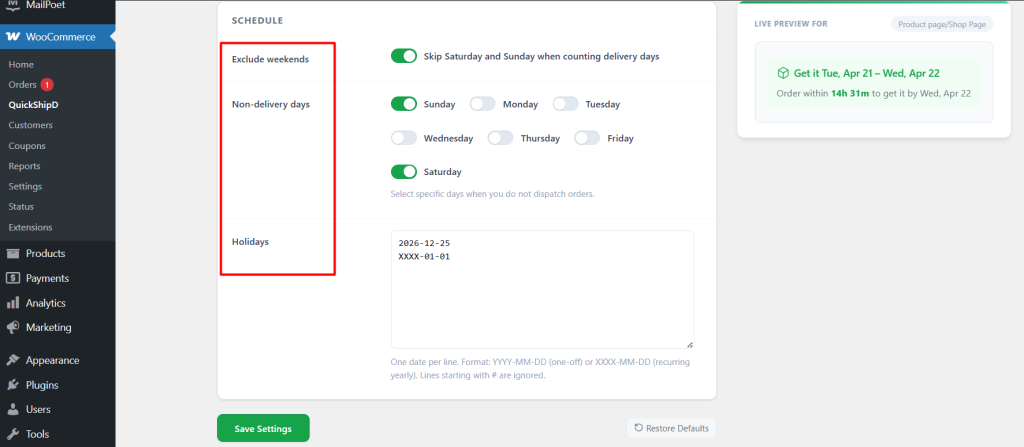
Before your known busy period starts, widen your maximum delivery days temporarily to reflect the realistic timeline under higher volume.
Then update your holiday list with any known warehouse closures or carrier blackout dates in advance. QuickShipD’s Delivery tab makes this a quick adjustment, not a re-setup.
| 💡 PRO TIP Set a calendar reminder a few weeks before your known peak period to review and widen your delivery estimate, then another reminder right after peak season ends to revert it. Both take a couple of minutes and prevent the estimate from silently staying wrong in either direction. |
What to Say When a Peak-Season Order Runs Late
Once a parcel is already late, the estimate is no longer the lever. How you communicate is.
- Tell them before they ask. A short proactive email when tracking stalls beats a defensive reply three days later.
- Name the cause plainly. “The carrier’s hub is backed up” lands better than a vague apology, because it is checkable and it is true.
- Give a revised window, not a new promise. A realistic range you will beat is worth more than a tight date you might miss twice.
- Open the trace yourself. You are the carrier’s account holder; the customer is not. Doing this without being asked is the part people remember.
Adjust the Number, Not the Trust
Peak season doesn’t have to mean broken promises. It means your estimate needs to reflect a genuinely different set of conditions for a limited window.
Widening it honestly protects the trust you’ve built the rest of the year, and QuickShipD makes that seasonal adjustment a quick settings change rather than a rebuild.
Frequently asked questions
What does “due to operating conditions, your package may be delayed” mean?
It is a carrier status — most often seen on UPS tracking — meaning conditions inside the carrier’s network are slowing your parcel down. Volume surges, weather, sorting equipment faults, staffing shortfalls and address or customs queries are the usual causes.
It does not mean the package is lost or cancelled. It is still in the network, and the message is a warning that the original date may slip rather than a report that something has gone wrong with the parcel itself.
How long does an “operating conditions” delay usually last?
Most domestic delays of this kind clear within about two to five days, once the parcel reaches a facility that can process and route it normally.
Peak season, widespread weather events and international customs holds can all extend that. If tracking has not moved at all for several working days, that is the point to open a trace with the carrier.
Should I tell customers about peak-season delays before they order?
Yes, and the cheapest way to do it is simply to widen the delivery estimate itself so the honest window is what they see at the point of purchase.
Shoppers accept longer windows during known busy periods. What they don’t accept is finding out after paying.
How early should I widen my delivery estimate before peak season?
A few weeks ahead is reasonable, giving you time to catch the adjustment before order volume actually climbs.
Waiting until you’re already backed up means the estimate is wrong for the customers who ordered in the meantime.
Should I add a specific cutoff date for holiday delivery guarantees?
If you want to guarantee delivery by a specific date like a major holiday, communicate a clear “order by” cutoff separately from your standard delivery estimate.
Make sure it’s based on your actual peak-season processing capacity rather than your normal one.
Do I need to remember to revert the estimate after peak season?
Yes. An estimate left artificially wide after peak season ends makes your store look slower than it actually is.
That costs you conversions unnecessarily, so pair the pre-season reminder with a post-season one.