
These two terms are often used interchangeably, but they refer to different stages of order fulfilment — and confusing them is why so many WooCommerce delivery estimates are wrong. Here’s exactly what each one means and why the distinction matters for your store.
Processing Time: What Happens Before the Package Leaves You
Processing time is everything between the customer placing an order and the package being handed to a carrier. It includes:
- Receiving and confirming the order
- Picking the item from your inventory
- Quality checking and packing
- Printing and attaching the shipping label
- Transporting the package to a drop-off point or scheduling a carrier pickup
For a streamlined fulfilment operation with pre-packed stock, processing might take a couple of hours. For handmade, custom, or made-to-order products, processing could take several days. This time is entirely within your control.
Shipping Time: What Happens After It Leaves You
Shipping time — also called transit time — is the period between the carrier collecting the package and it arriving at the customer’s address. This is what the carrier controls. A ‘3-day shipping’ option means 3 days of transit after the carrier picks it up — not 3 days after the customer orders.
Shipping time varies by carrier, service level, origin, destination, and factors outside anyone’s control like weather or customs for international shipments.
Why This Distinction Matters for Delivery Estimates
Total delivery time = processing time + shipping time. If you only account for shipping time in your delivery estimates, you’re systematically showing customers an earlier arrival date than you can actually deliver.
A store that takes 2 days to process and uses a 3-day shipping service has a total delivery time of 5 days. If the delivery estimate only shows 3 days, every customer will be disappointed — not because the carrier is slow, but because the estimate was built on incomplete information.
How to Get Both Right in Your Settings
In QuickShipD, the Minimum delivery days and Maximum delivery days fields represent total delivery time — the complete window from order placed to order arrived. You should add your typical processing time to your typical carrier transit time and enter the combined total.
If you process in 1 day and your carrier takes 3–5 days, your minimum is 4 and your maximum is 6. If you sometimes take 2 days to process, your minimum might be 4–5 and your maximum 7.
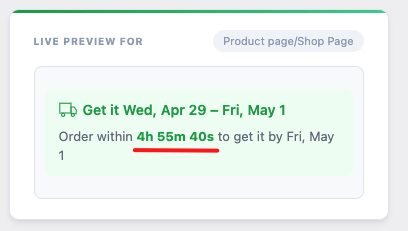
The Order cutoff time setting handles same-day processing — if an order comes in before the cutoff, it counts as dispatched that day. After the cutoff, processing effectively starts the following business day, and QuickShipD adds a day to the estimate automatically.
| ✅ KEY TAKEAWAY Always calculate your delivery estimates as: Processing Time + Carrier Transit Time = Total Delivery Days. Enter the total into your delivery settings — not just the transit time. This one adjustment makes delivery estimates dramatically more accurate. |