
If your WooCommerce store uses more than one shipping carrier — say, standard post for economy orders and a courier for express — each carrier has different transit times, different reliability, and potentially different non-delivery days. Showing one generic delivery estimate for all carriers is misleading. Here’s how to handle multiple carriers accurately.
Why Multiple Carriers Complicate Delivery Estimates
Delivery estimates get complicated with multiple carriers because transit times vary significantly. A standard postal service might take 5–7 business days; a same-day courier service might promise delivery within hours. If your estimate only reflects one of these, customers choosing the other option are seeing the wrong information.
The second complication is schedule variation. Some carriers don’t deliver on Saturdays. Others offer Saturday delivery at a premium. Public holidays affect carriers differently. A calculation that’s correct for one carrier might be wrong for another on the same day.
The Per-Product Approach: Map Carriers to Product Categories
If your different carriers are used for different types of products — for example, large items ship via freight and small items via standard post — you can solve most of the complexity with per-product delivery day overrides.
In QuickShipD, set your global delivery days to match your primary carrier. For products that ship via a different carrier with a different transit time, set per-product delivery day overrides in the product’s Shipping tab.
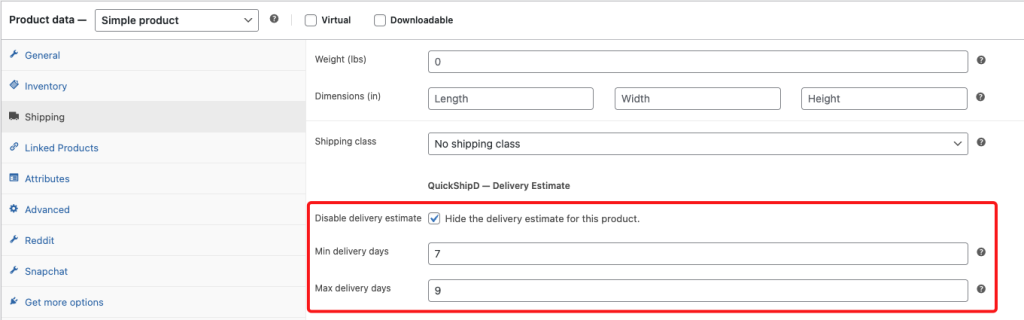
A product that ships via your standard 3–5 day carrier keeps the global setting. A product that ships via an express courier gets a 1–2 day override.
The Shipping Method Approach: Setting Expectations at the Method Level
If the same product can be sent via either standard or express shipping depending on what the customer chooses at checkout, the most honest approach is to show a delivery range that’s conservative enough to apply to your standard service, and communicate in your shipping method names that express is faster.
For example, naming your shipping methods ‘Standard (5–7 days)’ and ‘Express (1–2 days)’ within WooCommerce’s shipping settings gives customers method-level timeline information, while your product page estimate reflects the standard option. This sets the right baseline without requiring dynamically switching estimates based on the selected method.
When to Use Carrier API Integration
If you need highly accurate, real-time transit estimates per carrier per postal code — for a store with many carriers, many destinations, or where precision is critical — consider a carrier rate integration plugin that pulls live transit data from carrier APIs. This is more complex to configure but provides the most accurate multi-carrier estimates.
For most WooCommerce stores, however, the per-product override approach combined with well-named shipping methods covers the vast majority of real-world multi-carrier scenarios without that complexity.
| 💡 PRO TIP When in doubt, show the more conservative carrier’s estimate as your baseline and let customers opt into faster (and typically more expensive) delivery methods with clearly named shipping options. It’s better to under-promise on speed and offer an upgrade path than to show an aggressive estimate that only applies to your fastest carrier. |
Multiple carriers don’t have to mean multiple headaches. A clear global default, targeted per-product overrides for carrier-specific products, and well-named shipping methods at checkout gives your customers the delivery information they need — accurately.