
You’ve got a delivery estimate live on your product page, and it seems to be working. “Seems” is the operative word — without actually testing different versions of the message, you’re guessing whether “Get it by” outperforms “Arrives by,” or whether a date range converts better than a single date, for your specific customers.
Here’s how to actually test your delivery date messaging instead of assuming, and what’s realistic to test given the tools most WooCommerce stores have on hand.
What’s Actually Worth Testing
Not every variable is equally worth the effort. The wording of your text template — “Get it by {date}” versus “Arrives by {date}” versus “Delivered by {date}” — is a fast, low-risk test with a real chance of moving conversion. Date format (spelled-out versus numeric) is another quick one.
Bigger changes, like showing a date range instead of a single date, or turning the countdown timer on or off, are worth testing too, but they change more at once, which makes it harder to know exactly what drove any difference in results.
| 💡 PRO TIP Test one variable at a time. Changing the wording and the date format simultaneously means you won’t know which change actually caused any difference you see. |
A Practical Testing Approach Without a Dedicated A/B Tool
True split testing — showing different versions to different visitors at the same time — usually requires a dedicated A/B testing plugin or platform. If you don’t have one, a sequential test is a reasonable substitute: run one version for a set period, record your conversion rate, switch to the other version, and compare over an equivalent period.
The honest limitation here is that a sequential test isn’t as statistically clean as a true split test — external factors like seasonality or a marketing campaign running during one period but not the other can skew results. Try to run each period over a similar timeframe (both including a weekend, for instance) to reduce that risk.
| 🎯 NOTE If you’re running a genuine split test through a dedicated tool, make sure it’s testing the actual rendered text — not just internal settings — and give it enough traffic and time to reach a meaningful sample size before drawing conclusions. |
What to Measure
Add-to-cart rate and overall conversion rate are the most direct signals for delivery estimate wording. Cart abandonment rate is worth watching too, since a confusing or untrustworthy-sounding estimate can show up there rather than at the product page itself.
Stop Guessing, Start Measuring
The right wording for your delivery estimate isn’t universal — it depends on your audience, your products, and your price point. Testing it directly, even with a simple sequential approach, beats assuming a generic best practice applies to your store.
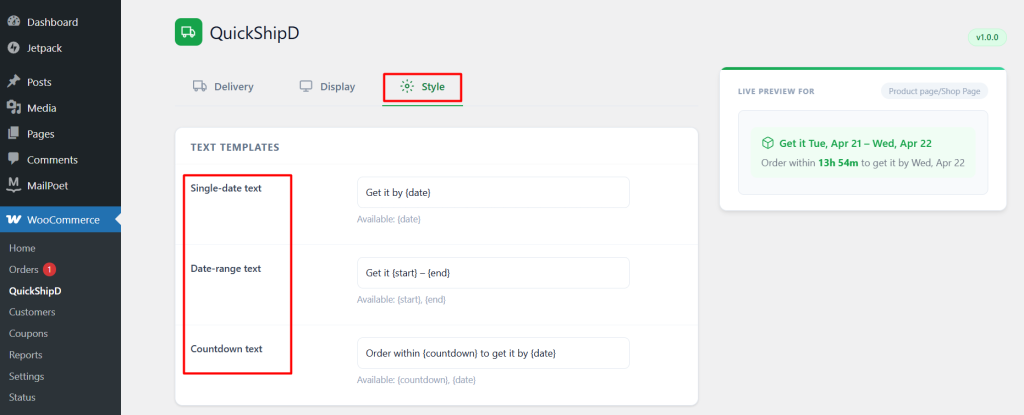
QuickShipD’s editable text templates make it easy to change your wording quickly as you test different versions.
Related Reading
- QuickShipD vs Estimated Delivery Date Per Product for WooCommerce: Which Is Better?
- Delivery Date vs. Shipping Date vs. Dispatch Date: What's the Difference?
- Can I Automate Delivery Date Calculations in WooCommerce?
- What Is an Estimated Delivery Date? (A Plain-English Guide)
- How Delivery Information Affects Product Page Bounce Rate