
Running a store in more than one language adds a layer most plugins weren’t built with in mind from day one: does the text actually translate, or does it stay stuck in whatever language it was configured in, regardless of what language the customer is browsing in?
Here’s what to know about delivery date display on a multilingual WooCommerce store, and what to check before assuming it just works.
What Actually Needs to Translate
A delivery estimate has two parts: the surrounding text template (“Get it by {date}”) and the calculated date value itself. The wording is plain text you enter directly into the Style tab, which means it’s only ever in the language you typed it in — it doesn’t automatically translate itself for different site languages.
| 🎯 NOTE This is true of most plugin-generated text, not a specific limitation of any one tool. Text you type into a settings field is static unless something else — like a translation plugin — is specifically set up to translate it per language. |
How to Handle Multiple Languages in Practice
If you’re running WPML, Polylang, or a similar translation plugin, the practical approach is translating your text template through that plugin’s string translation feature, the same way you’d translate any other static text generated by a plugin or theme.
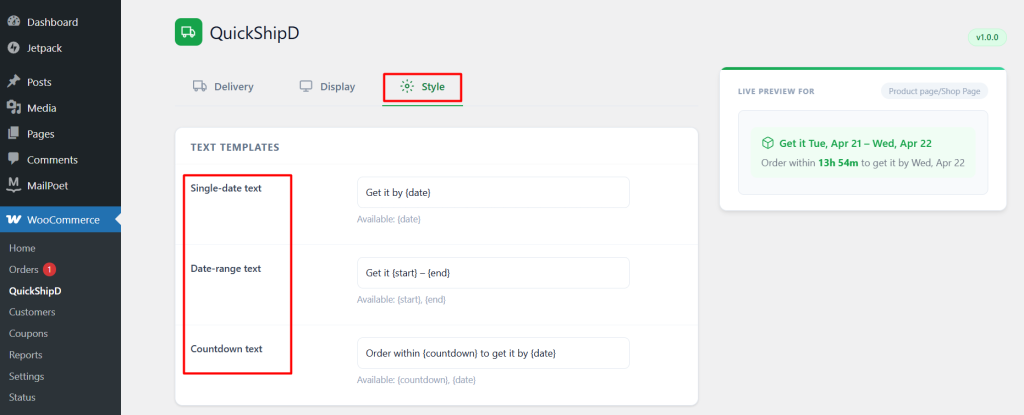
One honest limitation: QuickShipD doesn’t include built-in multilingual support that automatically detects the site’s current language and swaps templates on its own. Getting translated versions displaying correctly per language depends on your translation plugin’s string translation tools picking up and translating the text QuickShipD outputs.
| 🚧 IMPORTANT Test this specifically before relying on it for a live multilingual store. Switch your site to each configured language and confirm the delivery estimate text actually changes, rather than assuming your translation plugin picked it up automatically. |
What Doesn’t Need Translation
The calculated date itself — the actual day and date number — is just data, not language-dependent text, so it doesn’t need translating the way your wording does. Date format (numeric versus spelled-out) is a separate setting in the Style tab worth reviewing per audience, since date conventions vary by region regardless of language.
Test It Before You Trust It
Multilingual delivery estimates come down to whether your translation plugin correctly picks up and swaps the static text QuickShipD generates — not something built into the delivery calculation itself. Test it directly across your configured languages before assuming it’s working.
QuickShipD’s editable text templates give you a clear, single piece of text to translate per language, wherever you handle that translation.