
The language of your delivery estimate shapes how customers interpret your promise. ‘Ships in 3–5 days’ sounds operational — it tells the customer about your process, not their outcome. ‘Get it by Monday, May 19’ sounds like a commitment — it tells the customer exactly what they’ll have and when.
Choosing the right phrasing, and configuring it correctly in your WooCommerce store, is a small change that meaningfully affects how trustworthy your delivery information feels.
‘Arrives By’ vs ‘Delivery Range’ vs ‘Ships In’: When to Use Each
These three phrasing patterns serve different purposes and signal different things:
- ‘Ships in X days’: Focuses on your dispatch schedule, not the customer’s arrival. Technically accurate but unhelpful for planning. Avoid this as your primary estimate.
- ‘Get it Thu, May 14 – Mon, May 18’ (date range): Gives a window. Honest, useful, protects you against delivery variability. Best for most WooCommerce stores.
- ‘Get it by Monday, May 19’ (arrives-by single date): Strongest commitment. Maximum clarity. Use only when your delivery performance is consistent enough to reliably meet a specific date.
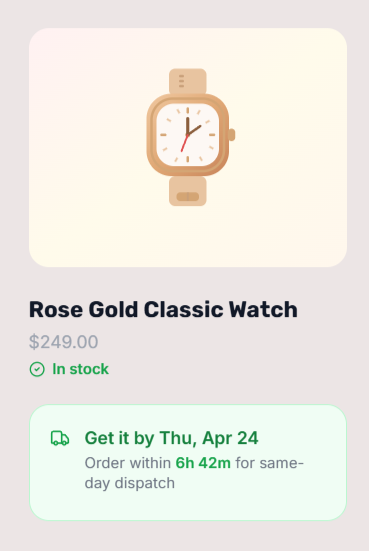
How to Configure ‘Arrives By’ Language in QuickShipD
QuickShipD’s Style tab includes a Text Templates section where you control the exact wording of your delivery estimate. There are separate templates for three scenarios:
- Single-date text: used when your minimum and maximum delivery days are the same — the default is ‘Get it by {date}’, which you can change to ‘Arrives by {date}’, ‘Delivered by {date}’, or any phrasing you prefer
- Date-range text: used when minimum and maximum days differ — default is ‘Get it {start} – {end}’, editable to ‘Arrives between {start} and {end}’ or similar
- Countdown text: the urgency line below the main estimate — default is ‘Order within {countdown} to get it by {date}’
The {date}, {start}, {end}, and {countdown} variables are replaced automatically with the correct calculated values. You’re editing only the surrounding language — the dates update in real time without any further changes.
Switching Between a Range and a Single ‘Arrives By’ Date
QuickShipD automatically switches between range display and single-date display based on your delivery day settings:
- If your minimum and maximum delivery days are different (e.g. 3 min, 5 max), it shows a range using your date-range text template
- If your minimum and maximum are the same number (e.g. both set to 3), it shows a single date using your single-date text template
To show a clean ‘Arrives by [date]’ estimate with no range, set both your minimum and maximum delivery days to the same value. Use this approach only if your delivery performance is reliable enough that a single committed date is honest — not aspirational.
| 💡 PRO TIP The phrase ‘Get it by’ outperforms ‘Estimated delivery’ in A/B tests across major retail sites. It sounds like a commitment rather than a guess. If your delivery performance supports it, switch your single-date template from a hedged phrase to a confident one — the wording alone can improve conversion. |
Date Format Options
QuickShipD’s Style tab also lets you choose the date format. Options include formats like ‘Mon, May 11’, ‘Monday, May 11′, and ’05/11/2026′. Choose a format that matches your store’s audience — spelled-out month names feel warmer and less ambiguous than numeric formats, which can cause confusion between day-first and month-first conventions depending on your customers’ location.