
Customers don’t just want to know that their order is coming — they want to know when. A tracking number tells them the order shipped. What they actually need to plan their day, coordinate a gift, or know whether to bother ordering at all is a concrete delivery window.
There’s no single magic moment to communicate delivery information. The best stores do it at multiple touchpoints — and they do it early.
Start With the Product Page
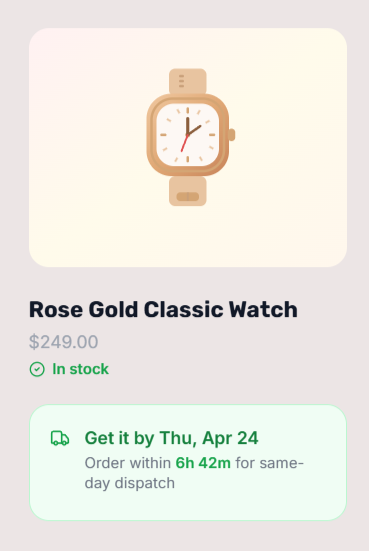
The product page is where the purchase decision happens. If a customer needs to receive something by a specific date — a birthday, an event, a deadline — they’ll decide right there whether to buy from you or go elsewhere. Showing the delivery estimate on the product page, before they add to cart, removes that uncertainty at the exact moment it matters.
A widget showing ‘Get it Thu, May 14 – Mon, May 18 — Order within 2h 51m to get it by Mon, May 18’ gives the customer everything they need: the delivery window, and a time-based nudge to act now rather than later.
Reinforce It at Checkout
Customers second-guess purchases at checkout. Delivery information shown at the order summary stage — right before they enter their card details — reinforces the purchase decision. Seeing a confirmed delivery window reduces checkout anxiety and the likelihood of abandonment.
QuickShipD displays per-item delivery estimates in the checkout order summary, and a summary estimate at the bottom of the order. This gives customers a clear picture of when everything in their cart will arrive, not just a generic shipping duration.
The Language Matters
‘Ships in 3–5 business days’ is not the same as ‘Get it by Friday.’ The first tells the customer when the package leaves you. The second tells them what they actually care about — when it arrives. Always frame delivery information in terms of arrival, not dispatch.
Specific dates outperform day counts. ‘Get it by Monday, May 19’ is more reassuring than ‘Arrives in 5–7 days’ because it’s concrete. The customer can put it in their mental calendar.
Be Accurate, Not Optimistic
The fastest way to destroy customer trust is to show an estimate that isn’t met. An optimistic estimate that’s regularly missed generates more complaints and returns than a slightly conservative one that’s consistently delivered on — or beaten.
Build your processing time into the estimate. Account for your actual dispatch schedule, not the ideal one. If weekends cause delays, exclude them. If you have a hard cutoff time after which orders don’t ship until the next day, use that cutoff in your settings.
| 💡 PRO TIP A live countdown timer alongside the delivery estimate (‘Order within 2h 14m to get it by Friday’) creates urgency without any artificial pressure. It’s simply true — and customers respond to it because it gives them a reason to decide now. |
What About After the Order Is Placed?
Once an order is confirmed, the delivery window moves from marketing to expectation management. Include the estimated delivery date in your order confirmation email. This reduces ‘where is my order?’ support tickets significantly, because customers already have a reference point to check against.
The combination of pre-purchase visibility and post-purchase confirmation is the most complete approach to delivery communication — and it’s achievable with the right WooCommerce setup.