
Showing a delivery date range — ‘Get it Thu, May 14 – Mon, May 18’ — is almost always better than showing a single exact date. Here’s why, and how to set it up properly.
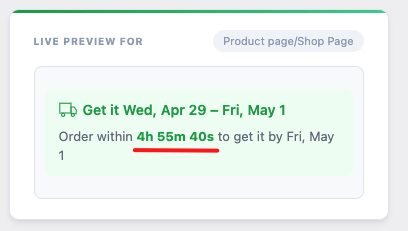
Why Ranges Beat Exact Dates for Most Stores
Exact dates feel precise, but they create a high-stakes promise. If you say ‘Arrives Friday’ and it arrives Monday, you’ve failed — even if Monday is still a fast delivery by any reasonable standard. A customer who sees ‘Arrives Friday’ and receives the package on Monday will feel the gap.
A range like ‘Get it Thursday to Monday’ sets a clear window while giving you buffer for the real-world variability that affects every shipment: carrier delays, processing queue changes, weather, and all the other factors outside your control.
At the same time, a range is specific enough to be genuinely useful. ‘Get it in 3–7 business days’ is vague. ‘Get it Thu, May 14 – Mon, May 18’ tells the customer exactly what week their package will arrive, which is enough to plan around.
How to Configure a Delivery Range in WooCommerce
To display a range rather than a single date, you need to set both a minimum and a maximum delivery day count. The minimum becomes the earliest possible arrival date; the maximum becomes the latest.
In QuickShipD’s Delivery tab, you’ll find separate fields for Minimum delivery days and Maximum delivery days. Set the minimum to the fastest you can reliably deliver — accounting for your processing time and best-case transit. Set the maximum to the realistic outer limit. A spread of 2–4 days is typical: for example, minimum 3 days and maximum 5 days.
QuickShipD then calculates the actual calendar dates from both numbers, skipping weekends and holidays according to your schedule settings, and displays the result as a date range automatically.
Customising the Range Text
By default, the range displays using a template like ‘Get it {start} – {end}’. In QuickShipD’s Style tab, under Text Templates, you can edit this to match your store’s tone. Some stores prefer ‘Estimated delivery: {start} to {end}’. Others use ‘Arrives between {start} and {end}’. The variables update automatically — you’re just choosing the surrounding words.
When to Show a Single Date Instead
If your minimum and maximum delivery days are the same number — say, both set to 3 — QuickShipD switches to single-date text automatically, showing ‘Get it by {date}’ rather than a range. Use this approach only if you have extremely reliable, consistent delivery performance. For most stores, a range is the safer and more honest choice.
| 💡 PRO TIP Set your maximum delivery day slightly conservatively — a day or two longer than your typical maximum. When customers receive their order before the end of the range, they feel like they got it early. That’s a small but consistent trust-builder that costs you nothing. |
The goal isn’t to show the fastest possible estimate. It’s to show an estimate you’ll reliably beat — and let customers be pleasantly surprised by early delivery rather than disappointed by late.